• Skip to primary navigation
  • Skip to main content
Premier Business Team

Premier Business Team

Your business connectivity and IT Team

  • Home
  • Business Internet
  • Business Phone
  • Blog
  • About Us
    • Our Featured Suppliers
  • Contact Us
  • Business Quote
    • Business Tech Assessment
  • Engineering
  • Call: 360-946-2626
  • Show Search
Hide Search

Blog Posts

Are Separate Cybersecurity Tools Dead? Why SASE Will Change the Way You Protect Your Business Internet in 2026

premierbusiness · January 31, 2026 ·

The cybersecurity landscape is undergoing its most significant transformation in a decade. While separate security tools aren't technically "dead," they're rapidly becoming as outdated as fax machines in a cloud-first world. The future belongs to SASE (Secure Access Service Edge), and 2026 is shaping up to be the tipping point where businesses either adapt to this integrated approach or get left behind by competitors who embrace unified security.

If you're still juggling multiple cybersecurity vendors, dealing with policy inconsistencies across different tools, or struggling to secure remote workers effectively, you're not alone. Most businesses are facing the same challenges with their fragmented security stacks. But there's a better way forward.

The Hidden Costs of Security Tool Sprawl

image_1

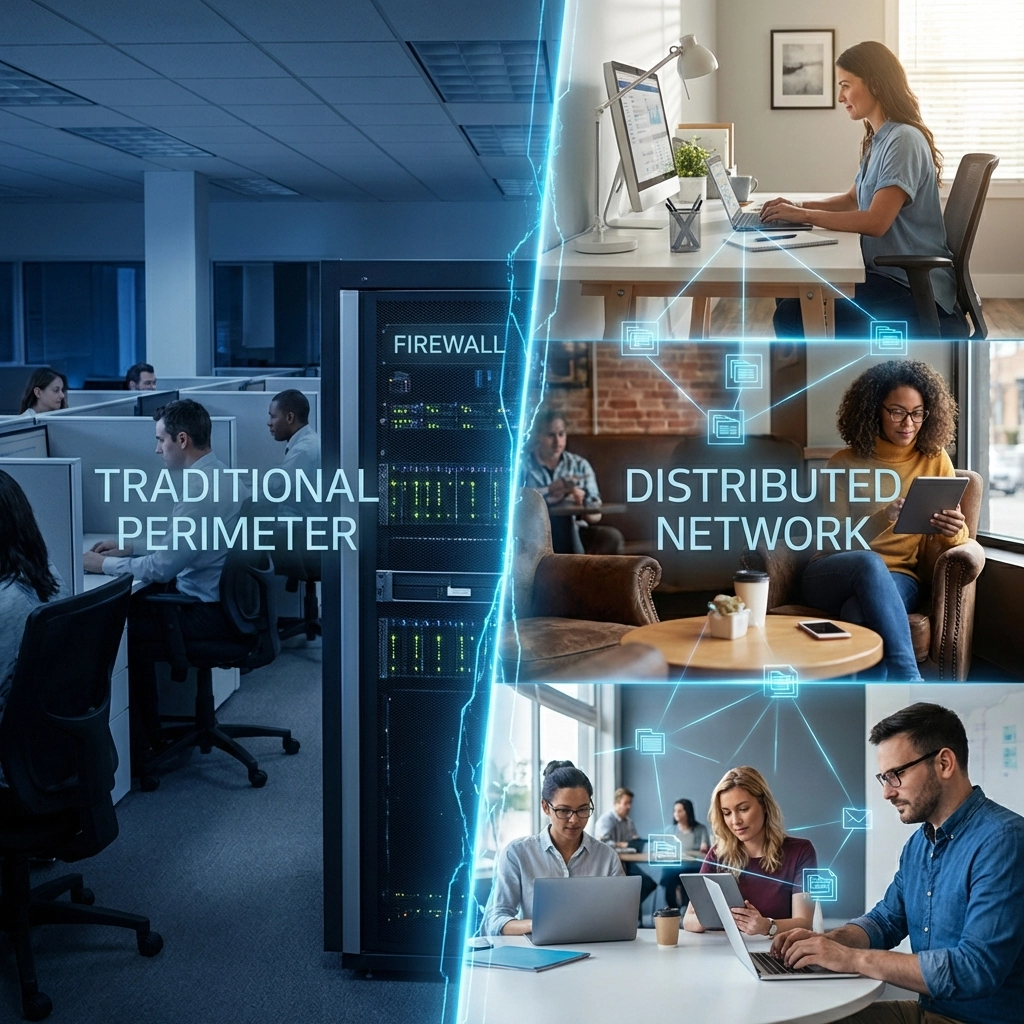
Modern businesses typically manage an overwhelming array of separate security tools: VPNs for remote access, firewalls for perimeter protection, secure web gateways for internet filtering, cloud access security brokers for SaaS protection, and data loss prevention tools for sensitive information. Each tool requires its own management console, policy configuration, and expertise.

This fragmentation creates several critical problems that directly impact your bottom line:

Visibility Gaps: When security tools operate independently, they create blind spots that cybercriminals actively exploit. Your firewall might block a threat while your web gateway allows similar malicious traffic through a different vector.

Inconsistent Policy Enforcement: Remote workers accessing company resources might face different security policies than office-based employees, creating compliance headaches and potential vulnerabilities.

Operational Complexity: IT teams spend countless hours managing multiple vendor relationships, learning different interfaces, and trying to correlate security events across disconnected systems.

Escalating Costs: Separate tools mean multiple licensing fees, hardware investments, and specialized training requirements. These costs compound quickly as your business grows.

For Bellingham businesses particularly, where many organizations operate with lean IT teams, managing multiple security tools becomes an unsustainable burden that diverts resources from core business objectives.

Understanding SASE: The Unified Security Revolution

SASE represents a fundamental shift from the traditional "castle and moat" security model to a cloud-native, identity-driven approach. Instead of bolting together separate tools, SASE delivers comprehensive security capabilities through a single, integrated platform.

image_2

Think of SASE as consolidating your entire security toolkit into one Swiss Army knife that's specifically designed for today's distributed workforce and cloud-first business environment.

Core SASE Components Include:

  • Zero Trust Network Access (ZTNA) replacing traditional VPNs
  • Secure Web Gateway (SWG) for internet protection
  • Cloud Access Security Broker (CASB) for SaaS security
  • Firewall as a Service (FWaaS) for network protection
  • Data Loss Prevention (DLP) for sensitive information

The magic happens in how these components work together seamlessly, sharing threat intelligence and applying consistent policies regardless of where users connect or which applications they access.

The Business Impact: Why SASE Makes Financial Sense

The transition to SASE isn't just about better security, it's about operational efficiency and cost optimization that directly impacts your profitability.

Unified Inspection and Control: Instead of traffic passing through multiple security checkpoints (each adding latency and complexity), SASE performs single-pass inspection that simultaneously handles threat detection, content filtering, and access control. This approach reduces network latency while improving security effectiveness.

Identity-Driven Security: SASE replaces static, location-based security rules with dynamic, identity-driven access controls. When an employee's behavior deviates from normal patterns, the system automatically adjusts their access permissions without manual intervention.

Simplified Management: One dashboard, one policy engine, one vendor relationship. IT teams can implement consistent security policies across the entire organization from a single interface, dramatically reducing administrative overhead.

Predictable Costs: SASE typically operates on a subscription model that scales with your business needs. This approach eliminates unexpected hardware refresh costs and provides predictable budgeting for security expenses.

According to recent industry analysis, organizations implementing SASE solutions often see 20-30% reductions in total security spending within the first two years, primarily through vendor consolidation and reduced operational complexity.

Market Momentum: The 2026 Tipping Point

image_3

The shift toward SASE isn't theoretical, it's happening now with accelerating momentum. Gartner research indicates that at least 85% of enterprises will have explicit SASE strategies and implementation timelines by 2026, representing a massive jump from just 10% in 2020.

This rapid adoption is driven by several converging factors:

Remote Work Permanence: The pandemic accelerated remote work adoption, but most organizations still rely on inadequate VPN solutions that create bottlenecks and security gaps.

Cloud-First Operations: As businesses migrate more applications to cloud platforms, traditional perimeter-based security becomes increasingly irrelevant.

Cybersecurity Skills Shortage: With qualified cybersecurity professionals in short supply, organizations need solutions that reduce complexity rather than adding to it.

Compliance Requirements: Regulatory frameworks increasingly require consistent security controls across all business locations and access methods.

However, implementation remains challenging. Currently, only 7% of enterprises unlock SASE's full value, indicating that while the technology is mature, successful deployment requires careful planning and expertise.

Implementation Strategy: Getting SASE Right

Successful SASE implementation isn't about ripping out existing infrastructure overnight. Smart organizations are taking a phased approach that minimizes disruption while maximizing benefits.

Phase 1: Assessment and Planning
Begin with a comprehensive audit of your current security stack, identifying redundancies, gaps, and integration challenges. This assessment should include business tech evaluation to understand how security changes will impact daily operations.

Phase 2: Pilot Deployment
Start with a specific use case, such as securing remote workers or protecting cloud applications. This approach allows you to demonstrate value while learning how SASE integrates with your existing systems.

Phase 3: Gradual Migration
Systematically replace individual security tools as contracts expire, ensuring continuous protection throughout the transition.

Phase 4: Full Integration
Complete the migration by integrating remaining systems and optimizing policies for maximum effectiveness.

Many organizations also pair SASE with Network Detection and Response (NDR) tools to maintain visibility into network behavior and encrypted traffic patterns that traditional SASE architectures might miss.

FAQ: Common SASE Questions Answered

Q: Will SASE work with our existing network infrastructure?
A: Yes, SASE solutions are designed to integrate with existing networks. However, you may need to adjust network configurations and update some legacy systems to fully realize SASE benefits.

Q: How does SASE impact network performance?
A: Properly implemented SASE typically improves performance by reducing the number of security inspection points and optimizing traffic routing through global network nodes.

Q: What about compliance requirements specific to our industry?
A: SASE platforms typically include compliance frameworks for major regulations (GDPR, HIPAA, SOX, etc.) and provide detailed audit trails for compliance reporting.

Q: How long does SASE implementation typically take?
A: Implementation timelines vary based on organization size and complexity, but most businesses complete phased SASE deployments within 6-12 months.

Q: Can we maintain some existing security tools during the transition?
A: Absolutely. Most organizations maintain hybrid environments during transition periods, gradually consolidating tools as they validate SASE functionality.

The Local Advantage: SASE for Bellingham Businesses

For businesses in the Pacific Northwest, SASE offers particular advantages given the region's distributed workforce and emphasis on cloud-first operations. Local organizations can leverage SASE to secure employees working from anywhere while maintaining the consistent security posture that customers and partners expect.

Premier Business Team has helped numerous Bellingham organizations navigate this transition, providing comprehensive cybersecurity solutions that align with business objectives while reducing operational complexity.

Ready to Transform Your Security Strategy?

The question isn't whether SASE will become the dominant security architecture: industry trends make that inevitable. The question is whether your business will be among the early adopters who gain competitive advantages through simplified operations and enhanced security, or if you'll be playing catch-up in a few years.

Don't let cybersecurity complexity hold your business back. Contact Premier Business Team today to schedule a comprehensive security assessment and learn how SASE can streamline your operations while strengthening your security posture. Our experts will work with you to develop a customized implementation strategy that minimizes disruption while maximizing the benefits of unified security.

Get your free security assessment and discover how SASE can transform your cybersecurity approach in 2026.


GoTo Cloud PBX Phone Systems for Ferndale Automotive Dealerships: Modern Communication Made Easy

premierbusiness · January 30, 2026 ·

Running an automotive dealership in Ferndale means juggling a lot of moving parts. Between sales calls, service appointments, parts inquiries, and customer follow-ups, your phone system is the backbone of daily operations. If you're still relying on a traditional PBX phone system, you're probably familiar with the frustrations: expensive maintenance, limited flexibility, and technology that just can't keep up with how modern customers want to communicate.

That's where GoTo Cloud PBX comes in. This unified communications platform was built with businesses like yours in mind: and Premier Business Team is here to help Ferndale automotive dealerships make the switch, save money, and experience a phone system actually designed for the way car dealerships operate in 2026.

Why Traditional Phone Systems Are Costing Your Dealership More Than You Think

Let's be honest: those old on-premise PBX systems served their purpose for decades. But times have changed, and so have customer expectations. Here's what's likely happening at your dealership right now if you're still on legacy phone equipment:

  • High maintenance costs: On-premise systems require regular service calls, hardware replacements, and IT support that adds up fast
  • Limited mobility: Your sales team can't take calls on the lot or follow up from home without awkward workarounds
  • Missed opportunities: Customers expect to reach you via text, video, or voice: and they won't wait around if you can't deliver
  • Outdated features: No CRM integration, no call analytics, no AI-powered tools to help your team work smarter

If any of this sounds familiar, you're not alone. Most dealerships across Whatcom County are dealing with the same challenges. The good news? There's a better way.

image_1

What Is GoTo Cloud PBX Unified Communications?

GoTo Cloud PBX is an IP-based phone system that runs entirely in the cloud. Instead of expensive on-site hardware, your calls, texts, video meetings, and voicemails all flow through a secure internet connection. Everything is managed through a simple online dashboard, and your team can access the system from desk phones, computers, or mobile devices.

But GoTo isn't just another cloud phone provider. Their GoTo Connect platform was specifically enhanced for automotive dealerships, with features that actually make sense for how your business operates.

Key Features That Matter for Ferndale Car Dealerships

Omnichannel Communications

Today's car buyers don't just call. They text, they email, they want to video chat before driving across town. GoTo Connect brings all of these channels into a single, unified inbox so your team never misses a lead: whether it comes in at 9 AM or 9 PM.

CRM Integrations Built for Automotive

This is where GoTo really shines for dealerships. The platform integrates directly with the tools you're already using:

  • VinSolutions
  • CDK
  • Tekion
  • Xtime

When a customer calls, their information pops up automatically. Call data logs itself into your CRM. Your team spends less time on data entry and more time closing deals.

AI-Powered Scheduling

GoTo's AI Receptionist can handle appointment booking around the clock. Integrated with Xtime, it keeps your service bays full without requiring staff to answer every scheduling call. That's a game-changer for service departments trying to maximize throughput.

Real-Time Analytics and Call Recording

Multi-location dealerships get centralized reporting dashboards with AI-powered insights. Track call volume, monitor response times, review recordings for training purposes, and make data-driven decisions about staffing and marketing.

image_2

How Ferndale Automotive Dealerships Save Money with GoTo Cloud PBX

Let's talk numbers. Upgrading to a cloud-based phone system isn't just about better features: it's about real cost savings that hit your bottom line.

Eliminated Hardware Costs

No more server rooms full of aging PBX equipment. No more emergency repair bills when something fails on a busy Saturday. GoTo Cloud PBX runs on standard IP phones or even existing devices, dramatically reducing your capital expenditure.

Predictable Monthly Pricing

Traditional phone systems come with surprise costs. Cloud PBX gives you one predictable monthly fee that covers everything: calls, features, updates, and support. Budgeting becomes a whole lot easier.

Reduced IT Burden

Your IT team (or your outside IT provider) won't need to spend hours troubleshooting phone issues. GoTo handles system maintenance, security updates, and feature rollouts automatically. If you're currently paying for business IT and network services, you'll see those costs drop when phone system headaches disappear.

Lower Long-Distance and Multi-Location Costs

Calling between your Ferndale location and other dealerships in your group? That's all included. No more per-minute charges eating into your margins.

Most dealerships see 30-50% savings on their overall communications costs within the first year of switching to cloud PBX.

See It in Action: Dealership-Focused Demos

Here's something we hear a lot from automotive clients: "Sounds great, but will it actually work for how we operate?"

That's why Premier Business Team offers guided demos specifically designed for car dealerships. We don't just show you generic features: we walk you through real scenarios:

  • How incoming sales calls get routed to available team members
  • What happens when a service customer texts to confirm an appointment
  • How managers can monitor call quality and team performance
  • What the mobile experience looks like for salespeople on the lot

You'll see exactly how GoTo Cloud PBX fits into your existing workflows before you commit to anything.

image_3

Why Work with Premier Business Team?

You could go directly to GoTo and sign up for cloud phone service. But here's what you'd miss by skipping a local technology advisor like Premier Business Team:

Vendor-Neutral Guidance

We work with multiple carriers and technology providers. If GoTo isn't the right fit for your dealership, we'll tell you. Our job is finding the best solution for your business: not pushing a specific product.

Local Expertise

We know Ferndale. We know Whatcom County. We understand the specific challenges that automotive businesses face in this market, from seasonal fluctuations to regional competition.

Full-Service Support

Phone systems don't exist in a vacuum. Premier Business Team can help with cybersecurity solutions, cloud email and productivity tools, and network infrastructure: so all your technology works together seamlessly.

Ongoing Partnership

We don't disappear after installation. As your dealership grows or your needs change, we're here to help you adapt your communications strategy.

If you're exploring the differences between cloud and traditional systems, our guide on Cloud Phone Systems vs Traditional PBX breaks down everything you need to know.

Frequently Asked Questions

How long does it take to switch from a traditional phone system to GoTo Cloud PBX?

Most dealership transitions take 2-4 weeks, including number porting, equipment setup, and staff training. We handle the heavy lifting so your operations aren't disrupted.

Can we keep our existing phone numbers?

Absolutely. Number porting is standard practice, and your customers won't notice any change except better service.

What internet speed do we need for cloud phone service?

A typical dealership with 20-30 phones needs a reliable business internet connection with at least 100 Mbps download speed. We'll assess your current setup and recommend upgrades if needed.

Is GoTo Cloud PBX secure?

Yes. GoTo uses enterprise-grade encryption and complies with industry security standards. Your calls and customer data are protected.

What happens if our internet goes down?

GoTo includes failover options that can route calls to mobile devices or alternate numbers during outages. You won't miss customer calls due to connectivity issues.

Do you offer support for POTS line replacement?

Yes. If you're still using traditional analog lines for fax, alarms, or elevators, we can help you transition those to modern IP-based solutions as well.


Ready to Modernize Your Dealership's Phone System?

Ferndale automotive dealerships deserve communication technology that keeps up with customer expectations: without breaking the budget. GoTo Cloud PBX delivers the features, flexibility, and cost savings that make a real difference in how your team operates every day.

Call Premier Business Team at 360-946-2626 to schedule your personalized dealership demo. Let's talk about what's possible for your business in 2026 and beyond.

Premier Business Team logo

5G Business Internet vs. Traditional Fiber: Which Saves Multi-Location Companies More Money in 2026?

premierbusiness · January 30, 2026 ·

When it comes to connecting multiple business locations, the choice between 5G business internet and traditional fiber can make or break your annual IT budget. With 5G networks becoming more robust and fiber infrastructure expanding rapidly in 2026, multi-location companies face a critical decision that could impact their bottom line by tens of thousands of dollars annually.

The short answer? 5G typically offers lower upfront costs per location, while fiber generally provides better long-term value : but the devil is in the details of your specific business needs.

Breaking Down the Real Costs: 5G vs Fiber in 2026

5G Business Internet Pricing Structure

5G business internet has become increasingly competitive, with most providers offering straightforward monthly pricing that includes equipment. Here's what you can expect:

  • Monthly costs: $50–$80 per location for standard plans
  • Premium plans: $70–$100 per location (AT&T, Verizon, T-Mobile)
  • Equipment: Usually included in monthly fee
  • Installation: Minimal to zero cost
  • Setup time: 24-48 hours per location

The beauty of 5G lies in its simplicity. There's no digging, no infrastructure installation, and no lengthy service agreements required for basic connectivity.

image_1

Traditional Fiber Internet Investment

Fiber internet pricing tells a more complex story, especially when you factor in the true total cost of ownership:

  • Monthly costs: $40–$150 per location
  • Business-grade plans: Starting at $69/month (Verizon, Comcast)
  • Installation fees: $500–$2,500 per location
  • Equipment costs: $200–$800 per location
  • Setup time: 2-8 weeks per location

While the monthly rates might seem competitive, the upfront infrastructure investment can be substantial for companies expanding to multiple locations quickly.

The Multi-Location Game Changer: Scalability Analysis

5G's Rapid Deployment Advantage

For businesses opening new locations or expanding into temporary sites, 5G's deployment speed creates significant financial advantages:

Scenario: Opening 5 new locations in 6 months

  • 5G total setup cost: $0–$500 (minimal equipment if any)
  • Fiber total setup cost: $2,500–$12,500 (installation + equipment)
  • Time to connectivity: 5G wins by 6-7 weeks per location

This speed advantage translates to revenue generation starting weeks earlier at each location, which can offset higher monthly costs over time.

Fiber's Long-Term Value Proposition

Despite higher upfront costs, fiber delivers advantages that can justify the investment for established multi-location operations:

  • 99.9% uptime reliability vs. 5G's variable performance
  • Symmetrical upload/download speeds crucial for cloud-heavy operations
  • Consistent performance regardless of time of day or network congestion
  • Lower latency for real-time applications and VoIP systems

image_2

Performance vs. Cost: The Reality Check

When 5G Makes Financial Sense

5G business internet becomes the cost-effective choice for:

  • Retail locations with moderate bandwidth needs (under 100 Mbps)
  • Temporary or seasonal locations where fiber installation isn't justified
  • Backup connectivity for existing fiber connections
  • Rural locations where fiber infrastructure doesn't exist
  • Companies prioritizing rapid expansion over maximum performance

When Fiber Justifies the Investment

Traditional fiber becomes the smarter long-term investment for:

  • Data-intensive operations requiring consistent high speeds
  • Companies relying heavily on cloud services needing symmetrical speeds
  • Call centers or businesses heavily dependent on VoIP quality
  • Locations handling sensitive data requiring maximum reliability
  • Established locations with 3+ year occupancy commitments

For businesses requiring reliable connectivity for critical operations, fiber's consistency can prevent costly downtime that more than compensates for higher infrastructure costs.

Real-World Cost Scenarios: 5G vs Fiber

Small Multi-Location Business (3-5 locations)

5G Approach:

  • Monthly: $240–$400 across all locations
  • Annual: $2,880–$4,800
  • 3-year total: $8,640–$14,400

Fiber Approach:

  • Setup costs: $3,000–$7,500
  • Monthly: $210–$450 across all locations
  • Annual: $2,520–$5,400
  • 3-year total: $10,560–$23,700

Winner: 5G saves $1,920–$9,300 over 3 years for small operations with moderate bandwidth needs.

image_3

Medium Multi-Location Business (10-15 locations)

5G Approach:

  • Monthly: $700–$1,200 across all locations
  • Annual: $8,400–$14,400
  • 3-year total: $25,200–$43,200

Fiber Approach:

  • Setup costs: $10,000–$25,000
  • Monthly: $690–$1,350 across all locations
  • Annual: $8,280–$16,200
  • 3-year total: $34,840–$73,600

Winner: 5G maintains cost advantage, saving $9,640–$30,400 over 3 years.

Enterprise Multi-Location Business (25+ locations)

At enterprise scale, the calculation shifts significantly. Fiber's reliability and performance consistency become critical for operations, and the per-location infrastructure costs spread across larger deployments become more manageable.

Hidden Costs to Consider

5G Hidden Expenses

  • Data overage charges on unlimited plans with soft caps
  • Equipment replacement costs for 5G modems (2-3 year lifespan)
  • Performance inconsistency potentially impacting productivity
  • Limited upload speeds affecting cloud backup and collaboration

Fiber Hidden Benefits

  • Property value increase from fiber infrastructure
  • Future-proofing for bandwidth growth
  • Potential cost reductions as fiber markets mature
  • Better negotiating position for contract renewals

Making the Right Choice for Your Multi-Location Strategy

The decision ultimately depends on your business priorities:

Choose 5G if:

  • You're expanding rapidly and need immediate connectivity
  • Your locations are temporary or seasonal
  • Your bandwidth needs are moderate and consistent
  • Upfront costs are a major constraint
  • You need backup connectivity solutions

Choose Fiber if:

  • Your business depends on consistent, high-speed internet
  • You handle large file transfers or cloud-intensive operations
  • Your locations are permanent (3+ years)
  • You can absorb higher upfront infrastructure costs
  • Maximum reliability is non-negotiable

For many businesses, a hybrid approach works best : using fiber for headquarters and high-traffic locations while deploying 5G for smaller sites, temporary locations, or backup connectivity.

Frequently Asked Questions

Q: Can I switch from 5G to fiber later without penalties?
A: Most 5G providers offer month-to-month contracts, making switching relatively easy. However, you'll lose any promotional pricing and face fiber installation costs at that time.

Q: What happens to 5G performance during peak hours?
A: 5G speeds can drop by 20-50% during peak usage times (typically 7-9 PM) due to network congestion, while fiber maintains consistent speeds.

Q: Do I need backup internet with fiber connections?
A: While fiber is highly reliable, many businesses use 5G as backup connectivity due to its quick deployment and separate infrastructure path.

Q: How do weather conditions affect each option?
A: Fiber is largely weather-proof once installed. 5G can experience reduced speeds during heavy rain or storms, though service rarely goes completely offline.

Q: What about customer support differences?
A: Fiber typically offers dedicated business support with faster resolution times, while 5G support is often shared with consumer services.

Ready to determine the most cost-effective internet solution for your multi-location business? Our connectivity experts at Premier Business Team can analyze your specific requirements and provide detailed ROI calculations comparing 5G and fiber options. Contact us today for a free assessment and discover which solution will save your company the most money in 2026 and beyond.

Lynden Car Dealerships: Cut Costs & Transform Communications with GoTo Cloud Phone Systems

premierbusiness · January 29, 2026 ·

Running a car dealership in Lynden means juggling a lot, sales calls, service appointments, parts inquiries, and keeping your team connected across the showroom floor, service bays, and finance offices. If your dealership is still relying on an aging phone system with tangled wires and sky-high maintenance bills, you're leaving money on the table and frustrating both your staff and customers.

The good news? There's a better way. Upgrading to a GoTo cloud-based unified communications system can slash your phone costs, streamline operations, and give your dealership the modern tools it needs to compete in 2026. And the team at Premier Business Team is here to make that transition seamless, with a demo specifically designed for automotive businesses like yours.

Why Lynden Dealerships Are Ditching Traditional Phone Systems

Let's be honest: traditional PBX phone systems were built for a different era. Those clunky on-premise boxes require constant maintenance, expensive technician visits, and hardware upgrades that drain your budget. Every time something breaks, you're scrambling to find a vendor who can actually fix it.

For dealerships like Hinton Chevrolet Buick, Chad Chambers Auto Sales, or Bellingham Truck Center along the Guide Meridian corridor, the stakes are even higher. Missed calls mean missed sales opportunities. Dropped transfers between sales and service frustrate customers. And trying to coordinate communication across multiple departments feels like herding cats.

image_1

Here's what we hear from Lynden-area dealerships struggling with legacy systems:

  • High monthly phone bills with little visibility into what you're actually paying for
  • Frequent downtime that costs you leads and damages your reputation
  • Limited mobility, your sales team can't take calls on the lot or follow up from home
  • No integration with your CRM or DMS systems
  • Outdated voicemail that customers hate navigating

Sound familiar? You're not alone, and there's a clear path forward.

Enter GoTo: Cloud PBX Built for Modern Dealerships

GoTo's unified communications platform is a game-changer for automotive businesses. Instead of maintaining expensive hardware on-site, your entire phone system lives in the cloud, accessible from desk phones, smartphones, laptops, or tablets. It's IP-based, meaning it runs over your existing internet connection, and it's packed with features that traditional systems simply can't match.

Key Features That Matter for Car Dealerships

Unified Communications in One Platform
GoTo brings voice calling, video meetings, team messaging, and SMS into a single application. Your sales manager can hop on a video call with a customer to walk through financing options. Your service advisor can text appointment reminders. Your receptionist can transfer calls to any device, anywhere.

Auto Attendant & Smart Call Routing
Never miss a customer call again. GoTo's auto attendant greets callers professionally and routes them to the right department, sales, service, parts, or finance, without human intervention. Set up custom schedules so after-hours calls go to voicemail or forward to a manager's cell phone.

CRM Integration
Connect GoTo with your dealership management system to see customer information pop up the moment they call. Your team can provide personalized service without fumbling through records.

Mobile App for Your Sales Team
Your salespeople aren't chained to desks, they're on the lot, at auctions, or following up with customers from the road. GoTo's mobile app lets them make and receive calls using the dealership's main number, keeping personal cell numbers private and maintaining a professional image.

Call Analytics & Reporting
See exactly how your team handles calls. Track response times, missed calls, and call duration to identify coaching opportunities and improve customer experience.

Learn more about how cloud phone systems compare to traditional PBX in our detailed breakdown: Cloud Phone Systems vs. Traditional PBX: Which is Better for Your Business in 2026?

image_2

How Lynden Dealerships Save Money with GoTo

Switching to GoTo isn't just about better features, it's about real cost savings that impact your bottom line.

Lower Monthly Costs

Traditional PBX systems come with hefty maintenance contracts, per-line fees, and long-distance charges. GoTo offers predictable per-user pricing with unlimited domestic calling. Most dealerships see 30-50% savings on their monthly telecom bills.

Eliminate Hardware Expenses

No more paying for on-premise PBX equipment, replacement handsets, or emergency repair visits. GoTo runs on standard IP phones or softphones on existing devices. When you need to add a user, it takes minutes, not a service call.

Reduce IT Burden

Your dealership's IT resources (or lack thereof) shouldn't be spent troubleshooting phone issues. GoTo is fully managed in the cloud with automatic updates, 99.999% uptime, and 24/7 support.

Scale Without Pain

Opening a second location? Adding seasonal staff? With GoTo, scaling up or down is instant. No new hardware, no rewiring, no waiting weeks for installation.

A Demo Built Specifically for Car Dealerships

Here's where Premier Business Team stands apart. We don't just sell phone systems, we understand your industry. We've worked with automotive clients across Whatcom County and know the unique challenges dealerships face.

That's why we've developed a GoTo demo experience tailored specifically for car dealerships. During your demo, we'll show you:

  • How to set up call routing between sales, service, parts, and finance
  • Mobile app workflows for salespeople on the lot
  • Integration options with popular DMS platforms
  • Real-world cost comparisons based on your current phone bills
  • After-hours call handling and voicemail-to-email features

We'll walk through scenarios that actually happen at your dealership, like transferring a customer from the service drive to the sales floor, or handling overflow calls during a big sales event.

Explore our full range of UCaaS and IP phone system solutions to see what's possible.

image_3

Why Partner with Premier Business Team?

Premier Business Team isn't a faceless national vendor. We're local to the Bellingham area and serve businesses throughout Whatcom County, including Lynden, Ferndale, Blaine, and beyond. When you work with us, you get:

  • Local support from a team that understands your market
  • White-glove installation with minimal disruption to your operations
  • Training for your staff so everyone feels confident on day one
  • Ongoing partnership for adds, moves, and changes as your dealership grows

We also handle the heavy lifting on your network infrastructure. A solid phone system needs reliable internet and properly configured networking equipment. Check out our business IT and network installation services to ensure your foundation is rock-solid.

And if you're looking at upgrading your internet to support cloud communications, explore our Bellingham business internet services for options that fit your bandwidth needs.

Frequently Asked Questions

What is a cloud PBX phone system?
A cloud PBX (Private Branch Exchange) is a business phone system hosted in the cloud rather than on physical hardware at your location. It delivers all the features of a traditional phone system, plus modern capabilities like video conferencing, mobile apps, and CRM integration, without the maintenance headaches.

How much can my dealership save by switching to GoTo?
Most dealerships see 30-50% reductions in monthly telecom costs. Savings come from eliminating maintenance contracts, reducing per-line fees, and consolidating multiple communication tools into one platform.

Will switching disrupt my dealership's operations?
Premier Business Team handles the migration carefully to minimize downtime. We typically port numbers and complete installation outside of peak business hours, and we provide training so your team is ready from day one.

Can my sales team use their personal cell phones with GoTo?
Yes! The GoTo mobile app allows salespeople to make and receive calls using the dealership's main number on their personal devices. Customers see your business number, not a personal cell.

Does GoTo integrate with dealership management systems?
GoTo offers integrations with many popular CRM and DMS platforms. During your demo, we'll discuss your specific systems and show you how integration can streamline workflows.

What kind of internet connection do I need?
Cloud phone systems require a stable internet connection with sufficient bandwidth. Premier Business Team can assess your current setup and recommend upgrades if needed.


Ready to Modernize Your Dealership's Communications?

Lynden car dealerships deserve a phone system that works as hard as they do. GoTo's cloud-based unified communications platform delivers the features, flexibility, and cost savings that automotive businesses need to thrive in 2026.

Schedule your free, dealership-specific GoTo demo today. Our team will show you exactly how much you can save and how seamless the transition can be.

Call Premier Business Team at 360-946-2626 or visit our website to get started. Let's transform the way your dealership communicates.

Cybersecurity Secrets Revealed: What IT Consultants Don't Want Small Businesses to Know About Zero Trust in 2026

premierbusiness · January 29, 2026 ·

Here's the thing about "cybersecurity secrets" – most of them aren't really secrets at all. They're just practical steps that small business owners don't know about because they're buried under layers of technical jargon and expensive enterprise solutions.

Zero Trust security is one of those topics that gets overcomplicated by vendors trying to sell million-dollar platforms to Fortune 500 companies. But here's what many IT consultants won't tell you upfront: Zero Trust for small businesses doesn't require a massive budget or a computer science degree to implement effectively.

Let's cut through the noise and talk about what Zero Trust actually means for your business in 2026, and why the traditional "castle and moat" approach to cybersecurity is leaving small businesses more vulnerable than ever.

Why Your Current Security Strategy Is Failing (And You Don't Even Know It)

Most small businesses still think about cybersecurity like it's 2010. You've got a firewall at your office, maybe some antivirus software, and you figure that's enough to keep the bad guys out. This approach worked when everyone sat at desks in the same building using the same computers every day.

But think about how your team actually works now:

  • Sarah from accounting logs in from her home office three days a week
  • Your sales rep accesses customer data from his phone while traveling
  • You're using cloud apps like Google Workspace, Salesforce, or QuickBooks Online
  • Employees bring their own devices and expect them to "just work"

Traditional perimeter security assumes there's a clear line between "inside" (safe) and "outside" (dangerous). Zero Trust assumes the opposite: trust nothing and verify everything, regardless of location.

image_1

The numbers tell the story. Small businesses experience cyberattacks every 39 seconds, and 60% go out of business within six months of a major security breach. Why? Because attackers know small businesses often have the same valuable data as large companies, but with fewer resources dedicated to security.

The Real Zero Trust "Secrets" That Actually Work for Small Businesses

Secret #1: Multi-Factor Authentication Is Your Biggest Bang for the Buck

Forget expensive security platforms for now. If you implement one thing this year, make it multi-factor authentication (MFA) across all your business accounts. This single step prevents 99.9% of automated attacks, even when passwords get compromised.

MFA works because attackers can steal or guess passwords, but they can't easily steal your phone or authenticator app at the same time. It's like having a second lock on your door – not impossible to defeat, but enough to make most thieves move on to easier targets.

Secret #2: Role-Based Access Controls Don't Cost Extra

This is where many small business owners get confused. They think Zero Trust means buying expensive software, but one of the most effective controls is simply deciding who can access what – and documenting those decisions.

Ask yourself:

  • Does your bookkeeper really need access to customer contact information?
  • Should temporary employees have the same system access as managers?
  • When someone leaves the company, do you have a process to remove all their access immediately?

These are policy decisions, not technology purchases. Most business applications already have role-based permissions – you just need to use them intentionally.

Secret #3: Device Health Checks Are Easier Than You Think

Zero Trust requires verifying that devices meet basic security standards before they can access company data. This sounds complex, but modern business platforms make it surprisingly straightforward.

For example, if you're using Google Workspace, you can require devices to:

  • Have screen locks enabled
  • Keep operating systems updated
  • Run approved antivirus software
  • Encrypt stored data

When employees try to access company email or files from a device that doesn't meet these standards, they get blocked until they fix the issues.

Why Small Businesses Are Actually Prime Targets (And How to Stop Being One)

Here's an uncomfortable truth: cybercriminals specifically target small businesses because they expect weaker security. You have valuable data – customer information, financial records, employee details – but typically fewer security resources than large enterprises.

image_2

The shift to cloud applications and remote work has made this targeting even more effective. Your data doesn't live behind a single firewall anymore. It's scattered across multiple cloud services, accessed from various devices and locations.

Traditional security models can't keep up with this reality. Zero Trust can, because it's designed for exactly this scenario: distributed data, remote workers, and cloud applications.

Your 90-Day Zero Trust Implementation Roadmap

Phase 1 (Days 1-30): Foundation

  1. Inventory your applications and data: List every cloud service, application, and system your business uses
  2. Implement MFA everywhere: Start with email, accounting software, and any application that contains sensitive data
  3. Review user access: Document who has access to what, and remove access that's no longer needed

Phase 2 (Days 31-60): Monitoring and Policies

  1. Set up basic monitoring: Enable login alerts and unusual activity notifications
  2. Create device policies: Establish minimum security requirements for any device accessing company data
  3. Plan for incidents: Know who to call and what to do if you suspect a security breach

Phase 3 (Days 61-90): Advanced Controls

  1. Implement conditional access: Require additional verification for high-risk activities
  2. Regular access reviews: Schedule quarterly reviews of who has access to what
  3. Employee training: Help your team recognize and report potential security threats

The Vendor-Neutral Advantage

Here's where many IT consultants have a conflict of interest: they make more money selling specific security products than helping you find the most cost-effective solution for your situation.

At Premier Business Team, we take a different approach. We evaluate your actual needs, existing systems, and budget constraints to recommend solutions that make sense for your business – not the ones that generate the highest commissions.

This vendor-neutral perspective is especially important for Zero Trust implementations because the most effective approach often involves using security features that are already built into applications you're already paying for, rather than adding expensive third-party tools.

image_3

For businesses in Bellingham and the Pacific Northwest, we also understand compliance requirements for industries like healthcare, finance, and legal services. Zero Trust isn't just about preventing attacks – it's about meeting regulatory requirements efficiently.

Frequently Asked Questions About Zero Trust for Small Businesses

Q: How much does Zero Trust cost for a small business?
A: Many foundational Zero Trust controls cost nothing extra if you're already using modern business applications. MFA, role-based access, and basic monitoring are often included in platforms like Google Workspace, Microsoft 365, or your existing business applications.

Q: Do I need to hire a cybersecurity expert to implement Zero Trust?
A: Not necessarily. While complex implementations benefit from expert guidance, small businesses can start with basic controls and gradually add more sophisticated measures. The key is having a clear plan and knowing when to get help.

Q: Will Zero Trust slow down my employees or make systems harder to use?
A: Well-implemented Zero Trust should be nearly invisible to users during normal operations. The additional security steps (like MFA) add seconds to login processes but shouldn't interfere with daily work.

Q: How do I know if Zero Trust is working?
A: Look for metrics like reduced security incidents, faster response times when issues occur, and increased visibility into who's accessing what data. You should also see improved compliance audit results.

Q: What's the biggest mistake small businesses make with Zero Trust?
A: Trying to implement everything at once instead of starting with high-impact, low-cost measures like MFA and access controls. It's better to do a few things well than many things poorly.

Don't Wait for a Security Incident to Take Action

Zero Trust isn't about paranoia – it's about adapting your security approach to match how business actually works in 2026. Your employees need to access company data from various devices and locations. Your applications live in the cloud. Your traditional perimeter-based security model can't protect you in this environment.

The good news is that you don't need to overhaul everything overnight or spend a fortune on enterprise security platforms. Start with the basics: multi-factor authentication, role-based access controls, and device health checks. These foundational steps will dramatically improve your security posture while you plan more advanced measures.

If you're ready to stop hoping your current security approach is "good enough" and start implementing Zero Trust controls that actually work for small businesses, we're here to help. Premier Business Team specializes in practical, cost-effective cybersecurity solutions that fit real-world business needs and budgets.

Our cybersecurity solutions are designed specifically for small and medium-sized businesses that need enterprise-level protection without enterprise-level complexity or cost.

Ready to secure your business the right way? Call us at 360-946-2626 to schedule a free cybersecurity assessment and learn how Zero Trust can work for your specific situation.

  • « Go to Previous Page
  • Page 1
  • Interim pages omitted …
  • Page 22
  • Page 23
  • Page 24
  • Page 25
  • Page 26
  • Interim pages omitted …
  • Page 78
  • Go to Next Page »

Get a no obligation quote for your business. Learn More

Proud Chamber Member

Bellingham Chamber Badge

Premier Business Team

Copyright © 2026 · Premier Business Team 2219 Rimland Dr. Suite 301 Bellingham, WA 98226 - 360-946-2626

  • Home
  • Business Internet
  • Business Phone
  • Blog
  • About Us
  • Contact Us
  • Business Quote
  • Engineering
  • Call: 360-946-2626