• Skip to primary navigation
  • Skip to main content
Premier Business Team

Premier Business Team

Your business connectivity and IT Team

  • Home
  • Business Internet
  • Business Phone
  • Blog
  • About Us
    • Our Featured Suppliers
  • Contact Us
  • Business Quote
    • Business Tech Assessment
  • Engineering
  • Call: 360-946-2626
  • Show Search
Hide Search

Blog Posts

Portland & Hillsboro Data Center Services: Expert Consulting & Resilient Connectivity

premierbusiness · January 24, 2026 ·

The Pacific Northwest has quietly become one of North America's most strategic locations for data center development: and Portland and Hillsboro, Oregon sit right at the center of this growth. With abundant renewable energy, direct trans-Pacific connectivity, and a climate that naturally supports efficient cooling, the region attracts enterprises and hyperscalers alike.

But navigating the complex landscape of data center builds, connectivity options, and compliance requirements? That's where having a vendor-neutral expert in your corner makes all the difference.

Premier Business Team provides comprehensive data center consulting services for businesses looking to establish, expand, or optimize their presence in the Portland and Hillsboro markets. Whether you're architecting a new facility, evaluating colocation options, or ensuring resilient multi-cloud connectivity, we bring the expertise you need: without the vendor bias.


Why Portland & Hillsboro for Your Data Center Operations in 2026

Portland and Hillsboro have emerged as a powerhouse region for data center infrastructure, and the momentum isn't slowing down. Here's what makes this market so attractive:

Renewable Energy Leadership

Oregon leads the nation in accessible renewable energy for data center operations. The region benefits from abundant hydroelectric power from the Columbia River system, plus growing wind and solar resources. For organizations with sustainability mandates or carbon reduction goals, Portland/Hillsboro offers a genuine path to greener computing.

Many facilities in the region already operate on 100% renewable energy, and local utilities actively work with data center operators to structure power purchase agreements that support clean energy commitments.

Climate-Optimized Efficiency

The Pacific Northwest's mild, temperate climate translates directly to lower cooling costs. Data centers in Portland and Hillsboro can leverage free-air cooling for significant portions of the year, dramatically reducing energy consumption compared to facilities in hotter climates like Phoenix or Dallas.

This natural advantage means better PUE (Power Usage Effectiveness) ratings and lower operating expenses over the life of your facility.

image_1

Strategic Trans-Pacific Connectivity

Portland/Hillsboro sits at a critical junction for trans-Pacific fiber networks. The region provides low-latency access to Asia-Pacific markets through submarine cable infrastructure: a major advantage for enterprises serving global customers or running distributed applications across international markets.

Local facilities offer connections to major internet exchanges, including the Northwest Access Exchange (NWAX), which connects to over 100 networks and ranks among the largest internet exchanges in the country.


Our Data Center Consulting Services

Premier Business Team takes a vendor-neutral approach to data center consulting. We're not locked into partnerships that limit your options: instead, we evaluate the full landscape of providers, technologies, and configurations to find the right fit for your specific requirements.

Site Selection & Feasibility Analysis

Choosing the right location within the Portland/Hillsboro market involves more than just comparing square footage and pricing. We analyze:

  • Power availability and redundancy options
  • Network connectivity and carrier diversity
  • Local permitting and zoning requirements
  • Proximity to your existing operations and personnel
  • Long-term expansion potential

Our team has deep familiarity with the regional market, from established campuses offering 50+ megawatts of capacity to emerging developments designed for next-generation AI and high-performance computing workloads.

Architecture & Design Consulting

Whether you're building a greenfield facility or optimizing an existing deployment, our architecture consulting services help you make informed decisions about:

  • Power density requirements (up to 80+ kW per cabinet for liquid-cooled, compute-intensive applications)
  • Cooling strategies optimized for Pacific Northwest climate conditions
  • Redundancy configurations that match your uptime requirements
  • Hybrid and multi-cloud integration points

We work with you to design environments tailored to your specific network, compute, and storage workloads: not cookie-cutter solutions that leave you over-provisioned or under-protected.

image_2

Connectivity Strategy & Implementation

The Portland/Hillsboro region offers exceptional connectivity options, but navigating them requires expertise. Local facilities provide:

  • 100 Gbps redundant backbone networks with 10-gigabit and 100-gigabit connections from leading carriers
  • Direct cloud on-ramps including AWS Direct Connect, Azure ExpressRoute, Google Cloud Interconnect, plus connections to Oracle, Salesforce, Nutanix, and IBM
  • Internet exchange access through NWAX and other regional peering points

Premier Business Team helps you architect connectivity strategies that balance performance, redundancy, and cost: ensuring you're not paying for capacity you don't need while maintaining the resilience your operations require.


The Vendor-Neutral Advantage

Here's the reality: most data center consultants have financial relationships with specific providers. That creates inherent bias in their recommendations.

Premier Business Team operates differently. We evaluate the full spectrum of options in the Portland/Hillsboro market: from major operators expanding to 350+ MW of planned capacity to specialized facilities purpose-built for specific workload types. Our recommendations are driven by your requirements, not our commission structure.

This approach means you get:

  • Honest assessments of provider strengths and limitations
  • Competitive pricing through informed negotiation
  • Solutions sized appropriately for your actual needs
  • Flexibility to adapt as your requirements evolve

Whether you need a single rack in a shared environment or a dedicated facility supporting AI/ML workloads at scale, we help you find the right fit.


Regulatory & Compliance Consulting

Data center operations in Oregon involve navigating local, state, and federal regulations: plus industry-specific compliance requirements that vary based on your business sector.

Our regulatory consulting services cover:

  • Local permitting and zoning navigation for new builds or expansions
  • Environmental compliance including energy efficiency standards and sustainability reporting
  • Security and data protection frameworks including SOC 2, HIPAA, PCI-DSS, and FedRAMP requirements
  • Utility coordination for power agreements and renewable energy certifications

We also help you understand Oregon's business incentives for data center development, ensuring you capture available benefits while meeting all compliance obligations.

For organizations already working with cybersecurity frameworks, we can integrate your data center security posture with your broader IT security strategy.

image_3


Frequently Asked Questions: Portland & Hillsboro Data Center Services

What makes Portland/Hillsboro attractive for data center development?

The region offers abundant renewable hydroelectric power, a mild climate that reduces cooling costs, strategic trans-Pacific fiber connectivity, and access to major internet exchanges. These factors combine to deliver lower operating costs and stronger sustainability credentials compared to many competing markets.

How much power capacity is available in the Portland/Hillsboro market?

Major operators are actively expanding capacity in the region. Current and planned capacity exceeds 350 MW across multiple facilities, with individual sites offering up to 80+ kW per cabinet for high-density computing applications.

Can Premier Business Team help with multi-cloud connectivity strategies?

Yes. We specialize in designing connectivity architectures that leverage direct cloud on-ramps to AWS, Azure, Google Cloud, and other major providers: optimizing for performance, redundancy, and cost efficiency.

Is Premier Business Team affiliated with specific data center providers?

No. We operate as a vendor-neutral consultant, evaluating all options in the market to find the best fit for your specific requirements. Our recommendations are driven by your needs, not provider partnerships.

What compliance frameworks can you help us navigate?

We assist with SOC 2, HIPAA, PCI-DSS, FedRAMP, and other industry-specific compliance requirements, plus local permitting, environmental regulations, and utility coordination.


Ready to Explore Portland & Hillsboro Data Center Options?

The Portland/Hillsboro market offers compelling advantages for organizations seeking renewable energy, resilient connectivity, and strategic positioning for global operations. But maximizing those advantages requires expert guidance through a complex landscape of providers, technologies, and regulatory requirements.

Premier Business Team brings the vendor-neutral expertise you need to make informed decisions: whether you're evaluating your first colocation deployment or planning a major facility expansion.

Let's talk about your data center requirements.

Request a Consultation


Premier Business Team provides IT infrastructure consulting and cloud services for businesses across the Pacific Northwest and beyond. Contact us to discuss your data center, connectivity, or telecommunications needs.


Everett Automotive Dealerships: Upgrade to GoTo Cloud Phone Systems and Save

premierbusiness · January 24, 2026 ·

Running a car dealership in Everett means juggling a lot of moving parts. Between sales calls, service appointments, financing inquiries, and follow-ups from your BDC team, your phone system is the backbone of your entire operation. If you're still running on an outdated traditional PBX or copper lines, you're probably dealing with dropped calls, missed opportunities, and monthly bills that make you wince.

Here's the good news: there's a better way. GoTo Connect for Automotive is a cloud-based unified communications platform built specifically for dealerships like yours. And Premier Business Team is here to help Everett automotive businesses make the switch, saving money while dramatically improving how your team connects with customers.

Why Traditional Phone Systems Are Holding Your Dealership Back

Let's be real. That legacy phone system in your back office? It was probably installed years ago, and it's showing its age. Traditional PBX systems require expensive on-site hardware, ongoing maintenance contracts, and dedicated phone lines that cost a small fortune every month.

Worse, they're rigid. Adding a new sales desk means running new wiring. Scaling up during busy seasons? Good luck. And when something breaks, you're at the mercy of a technician's schedule.

For Everett dealerships competing in a fast-moving market, this kind of inflexibility is a real liability. Customers expect instant responses across multiple channels, phone, text, web chat, even social media. A clunky phone system simply can't keep up.

If you're wondering whether POTS lines are still relevant in 2026, the short answer is: they're rapidly becoming obsolete for businesses that want to stay competitive.

image_1

What Makes GoTo Connect for Automotive Different

GoTo Connect isn't just another VoIP phone system. It's an AI-powered communications platform purpose-built for the automotive industry. That means it's designed around how dealerships actually work, not some generic business template.

Here's what that looks like in practice:

Unified Communications Across Every Department

Your sales floor, service department, finance office, and BDC team can all operate from a single cloud-based platform. Voice calls, video meetings, SMS, web chat, and even fax (yes, some customers still use it) are all managed in one place.

No more silos. No more missed handoffs between departments. Just seamless communication that keeps customers happy and deals moving forward.

Deep CRM and DMS Integration

GoTo Connect integrates with the dealership management systems you're already using, Tekion, VinSolutions, Car Wars, Momentum, and more. When a customer calls, your team sees their history, preferences, and service records instantly.

That kind of context turns a routine call into a personalized experience. And personalized experiences close deals.

AI-Powered Features That Actually Help

The platform includes an AI Receptionist that can handle appointment scheduling, answer common questions, and route calls intelligently, even during peak hours. Your team spends less time on repetitive tasks and more time selling cars and booking service appointments.

Multi-Channel Customer Engagement

Today's car buyers don't just call. They text. They message on Facebook. They use WhatsApp. GoTo Connect brings all those channels together so your team can respond quickly, no matter how customers reach out.

image_2

How Everett Dealerships Save Money with Cloud PBX

Let's talk dollars and cents, because that's what matters at the end of the day.

Traditional phone systems come with a laundry list of costs:

  • Hardware purchases and maintenance for on-site PBX equipment
  • Per-line charges for copper phone lines
  • Service contracts with local telecom providers
  • IT labor for troubleshooting and upgrades

Cloud-based systems like GoTo Connect flip that model on its head. There's no expensive hardware to maintain. Calls route over your existing internet connection. And scaling up or down is as simple as adjusting your subscription.

Most dealerships we work with see 20-40% reductions in monthly telecom costs after migrating to a cloud PBX system. That's real money you can reinvest in inventory, marketing, or staff.

Plus, with built-in analytics and reporting, you get visibility into call volumes, response times, and team performance. That data helps you make smarter decisions about staffing and operations, driving even more efficiency.

For a deeper dive into how cloud systems stack up against traditional PBX, check out our comparison: Cloud Phone Systems vs. Traditional PBX: Which Is Better for Your Business in 2026?

Premier Business Team: Your Local Partner for GoTo Implementations

Here's where we come in. Premier Business Team isn't just another vendor pushing software licenses. We're a consultative IT partner that works with Everett businesses to find the right solutions, and actually implement them properly.

Our Approach to Dealership Phone System Upgrades

1. Discovery and Assessment
We start by understanding your current setup, pain points, and goals. How many locations do you have? What CRM or DMS platforms are you using? Where are the bottlenecks in your customer communication?

2. Custom Solution Design
Based on that assessment, we design a GoTo Connect implementation tailored to your dealership. That includes department-specific call flows, integration with your existing systems, and training plans for your team.

3. Hands-On Demo
We don't expect you to sign on the dotted line without seeing the system in action. We offer hands-on demos designed specifically for automotive clients so you can experience how GoTo Connect handles the scenarios your team faces every day.

4. Seamless Migration
Our team handles the technical heavy lifting, porting numbers, configuring users, setting up integrations, so your dealership experiences minimal disruption during the transition.

5. Ongoing Support
After go-live, we stick around. Whether you need help adding new users, tweaking call routing, or troubleshooting an issue, Premier Business Team is just a phone call away.

If you're also looking at broader infrastructure upgrades, we handle firewall, switch, WiFi, and ethernet wiring installations to make sure your network can support modern cloud communications.

image_3

Real Results for Real Dealerships

Dealerships across the region are already seeing the benefits of unified communications platforms. Faster response times. Higher customer satisfaction scores. Lower monthly bills. And teams that actually enjoy using their phone system instead of fighting with it.

The automotive industry moves fast. Customers expect instant answers and seamless experiences. A modern cloud phone system isn't a luxury anymore, it's a competitive necessity.

Frequently Asked Questions

What is GoTo Connect for Automotive?
GoTo Connect for Automotive is a cloud-based unified communications platform designed specifically for car dealerships. It combines voice, video, SMS, chat, and fax into a single system with deep integrations for popular dealership management software.

How much can my dealership save by switching to a cloud phone system?
Most dealerships see 20-40% reductions in monthly telecom costs after migrating from traditional PBX to cloud-based systems like GoTo Connect.

Will GoTo Connect integrate with my existing CRM or DMS?
Yes. GoTo Connect integrates with major platforms including Tekion, VinSolutions, Car Wars, Momentum, Purple Cloud, and Communify.

How long does a typical phone system migration take?
Depending on the size and complexity of your dealership, most migrations take 2-4 weeks from initial assessment to full go-live.

Can I see a demo before committing?
Absolutely. Premier Business Team offers hands-on demos tailored to automotive clients so you can see exactly how the system works for your specific needs.

Does Premier Business Team provide ongoing support after installation?
Yes. We provide ongoing support, training, and optimization services to ensure your team gets maximum value from the platform.


Ready to Upgrade Your Everett Dealership's Phone System?

Stop losing calls, frustrating customers, and overpaying for outdated technology. Premier Business Team is ready to show you how GoTo Connect can transform communications at your dealership: and save you money in the process.

Call us today at 360-946-2626 to schedule your free consultation and hands-on demo. Let's build a phone system that works as hard as your team does.

Premier Business Team logo

Google Workspace, Cloud, Email, and Drive Services in Oak Harbor, WA

premierbusiness · January 24, 2026 ·

Oak Harbor businesses need reliable, secure, and scalable cloud solutions to compete in 2026's digital landscape. Premier Business Team delivers comprehensive Google Workspace, Cloud, Email, and Drive services designed specifically for Whidbey Island companies looking to modernize their operations without the complexity.

From retail stores on Pioneer Way to medical practices serving Naval Air Station personnel, Oak Harbor businesses trust our vendor-neutral approach to Google Cloud consulting, deployment, and ongoing support. We've helped dozens of local companies migrate from outdated email systems, implement secure cloud file sharing, and streamline operations with Google's productivity suite.

Why Oak Harbor Businesses Choose Google Workspace

Google Workspace transforms how Oak Harbor companies operate, offering enterprise-grade email, cloud storage, and collaboration tools accessible from anywhere. Whether your team works from downtown Oak Harbor or remotely across Whidbey Island, Google Workspace ensures seamless connectivity and productivity.

Key benefits for Oak Harbor businesses:

  • Professional business email with your custom domain
  • 30GB to unlimited cloud storage per user
  • Real-time document collaboration and editing
  • Advanced security features and admin controls
  • Mobile access for on-the-go productivity
  • Integration with existing business applications

Local restaurants use Google Drive to share menus and schedules across locations. Medical practices leverage Gmail's security features for HIPAA-compliant communication. Hotels manage reservations and guest communications through Google Workspace's unified platform.

image_1

Comprehensive Google Workspace Services for Oak Harbor Companies

Google Workspace Deployment and Setup

Premier Business Team handles complete Google Workspace implementation for Oak Harbor businesses. Our certified technicians configure your domain, set up user accounts, establish security policies, and ensure seamless integration with existing systems.

Deployment services include:

  • Domain verification and DNS configuration
  • User account creation and permission settings
  • Email migration from existing systems
  • Mobile device management setup
  • Third-party application integration
  • Custom security policy implementation

Business Email Migration and Management

Transitioning from outdated email systems to Gmail can seem daunting, but our Oak Harbor team makes it effortless. We migrate all emails, contacts, and calendars while maintaining business continuity throughout the process.

Our email migration process protects your data and minimizes downtime. We schedule migrations during off-hours, test functionality before cutover, and provide training to ensure your team adapts quickly to their new Gmail interface.

Google Drive and Cloud Storage Solutions

image_2

Oak Harbor businesses generate massive amounts of data that need secure, accessible storage. Google Drive provides the perfect solution with enterprise-grade security, unlimited storage options, and seamless file sharing capabilities.

We configure Google Drive to match your business workflow, establish folder structures, set sharing permissions, and implement backup protocols. Your team can access files from any device while maintaining security and version control.

Google Cloud Consulting and Strategy

Beyond basic Google Workspace features, Premier Business Team provides strategic Google Cloud consulting to help Oak Harbor businesses leverage advanced cloud capabilities. We assess your current technology stack, identify optimization opportunities, and develop implementation roadmaps.

Cloud consulting services:

  • Cloud migration strategy development
  • Cost optimization analysis
  • Security assessment and hardening
  • Scalability planning for business growth
  • Integration with existing business systems
  • Performance monitoring and optimization

Industry-Specific Google Workspace Solutions in Oak Harbor

Retail and Restaurant Solutions

Oak Harbor's retail and restaurant businesses need reliable point-of-sale integration, inventory management, and customer communication tools. Google Workspace integrates seamlessly with popular retail systems, enabling real-time inventory tracking, sales reporting, and customer relationship management.

Restaurant owners use Google Sheets for inventory management, Gmail for vendor communications, and Google Drive for recipe sharing across multiple locations. Our retail-focused implementation ensures POS systems sync with Google Workspace for comprehensive business management.

Healthcare and Medical Practice Support

image_3

Medical practices in Oak Harbor require HIPAA-compliant email and secure file sharing for patient records and communications. Google Workspace meets healthcare industry standards with advanced encryption, audit trails, and administrative controls.

We configure Google Workspace to support medical practices with secure patient communication protocols, appointment scheduling integration, and compliance reporting tools. Healthcare providers can collaborate on patient care while maintaining strict privacy standards.

Hospitality and Hotel Management

Oak Harbor's hospitality industry relies on seamless communication between front desk staff, housekeeping, and management. Google Workspace provides unified communication platforms that improve guest service and operational efficiency.

Hotels use Google Calendar for room booking management, Gmail for guest communications, and Google Drive for sharing policies and procedures. Our hospitality-focused setup ensures staff can access information from any location within your property.

Banking and Financial Services

Financial institutions in Oak Harbor need secure, compliant communication tools that protect sensitive customer information. Google Workspace's enterprise security features provide the protection and audit capabilities required for financial services.

We implement advanced security policies, multi-factor authentication, and data loss prevention tools to ensure compliance with financial regulations while maintaining user productivity.

Technical Implementation and Support Services

Migration Planning and Execution

Our Oak Harbor team develops comprehensive migration plans that minimize business disruption while ensuring complete data transfer. We assess your current email system, create detailed migration timelines, and execute transfers with precision.

Migration process includes:

  • Pre-migration system assessment
  • Data backup and verification
  • Staged migration scheduling
  • Post-migration testing and validation
  • User training and support
  • Ongoing optimization

Ongoing Support and Maintenance

Google Workspace requires ongoing management to maintain optimal performance and security. Premier Business Team provides continuous support for Oak Harbor businesses with proactive monitoring, regular updates, and responsive troubleshooting.

Our local support team understands Oak Harbor business needs and provides rapid response times for critical issues. We monitor system performance, apply security updates, and optimize configurations as your business grows.

image_4

Security and Compliance Features

Advanced Security Implementation

Oak Harbor businesses handle sensitive customer data that requires enterprise-level protection. Google Workspace includes advanced security features that we configure and manage to protect your business information.

Security features include:

  • Multi-factor authentication enforcement
  • Data loss prevention policies
  • Advanced threat protection
  • Mobile device management
  • Email encryption and archiving
  • Audit logging and reporting

Compliance Support

Businesses in regulated industries need Google Workspace configurations that meet specific compliance requirements. Our team ensures your implementation satisfies industry standards while maintaining user productivity.

We provide compliance reporting, policy enforcement, and audit support to help Oak Harbor businesses meet regulatory obligations without compromising operational efficiency.

Frequently Asked Questions About Google Workspace in Oak Harbor

Q: How long does Google Workspace implementation take for Oak Harbor businesses?
A: Most Oak Harbor businesses complete Google Workspace deployment within 1-2 weeks, depending on the size of your organization and complexity of your current systems. We provide detailed timelines during our initial consultation.

Q: Can Google Workspace integrate with our existing Oak Harbor business applications?
A: Yes, Google Workspace integrates with hundreds of business applications commonly used by Oak Harbor companies, including accounting software, CRM systems, and industry-specific tools.

Q: What happens to our current email during migration to Google Workspace?
A: We migrate all existing emails, contacts, and calendars to your new Google Workspace account with zero data loss. Your team maintains access to historical communications throughout the transition.

Q: Does Premier Business Team provide ongoing Google Workspace support for Oak Harbor businesses?
A: Absolutely. We offer comprehensive ongoing support including user training, system optimization, security management, and technical troubleshooting for all Oak Harbor Google Workspace clients.

Q: How much does Google Workspace cost for Oak Harbor businesses?
A: Google Workspace pricing starts at $6 per user per month for basic features, with enterprise plans available for larger organizations. We provide customized quotes based on your specific business requirements.

Q: Can remote employees access Google Workspace securely?
A: Yes, Google Workspace provides secure remote access with multi-factor authentication, device management, and VPN integration to protect your business data regardless of employee location.

Ready to transform your Oak Harbor business with professional Google Workspace implementation? Premier Business Team's certified consultants provide complete Google Cloud, email, and Drive services tailored to your specific industry needs. Contact us today for a free consultation and discover how Google Workspace can streamline your operations while enhancing security and collaboration. Call us now or visit our website to schedule your Google Workspace assessment and take the first step toward modernizing your Oak Harbor business technology.

Are You Making These Common Business Internet Backup Mistakes? (One Outage Could Cost You Everything)

premierbusiness · January 23, 2026 ·

Here's a scary stat for you: 51% of businesses shut down within two years of experiencing significant data loss. And yet, most companies are still making the same preventable backup mistakes that leave them vulnerable to outages, cyberattacks, and total system failures.

If your business relies on internet connectivity (and in 2026, whose doesn't?), then your backup strategy isn't just an IT checkbox, it's your lifeline. Let's break down the most common business internet backup mistakes we see every day, and what you can do to fix them before disaster strikes.


Mistake #1: Assuming Your Backups Actually Work

This is the big one. We've seen it countless times: a business owner tells us they have backups in place, but when we dig in, those backups haven't been tested in months, or ever.

The problem? Backups can fail silently. They can become corrupted, incomplete, or simply stop running due to configuration changes nobody noticed. And you won't find out until you desperately need to restore your data.

What to do instead:

  • Test your backups regularly, at minimum, quarterly
  • Run actual restoration tests to verify data integrity
  • Set up automated alerts for backup failures
  • Document your recovery procedures so your team knows exactly what to do

Think of it this way: an untested backup is basically the same as no backup at all.

Stressed IT technician in server room reacting to backup failure alerts, highlighting business internet risk.


Mistake #2: Relying on a Single Backup Method

We get it, managing multiple backup solutions sounds complicated. But relying on just one method creates a dangerous single point of failure.

Here's what can go wrong with each approach:

Backup Method Vulnerability
Cloud-only backups Depend on internet connectivity; can be slow to restore large datasets
Local storage only Susceptible to physical damage, theft, or on-site disasters
Manual processes Human error, forgotten backups, inconsistent schedules

If ransomware hits your network and your backups live on that same network? They're encrypted too. Game over.

What to do instead:

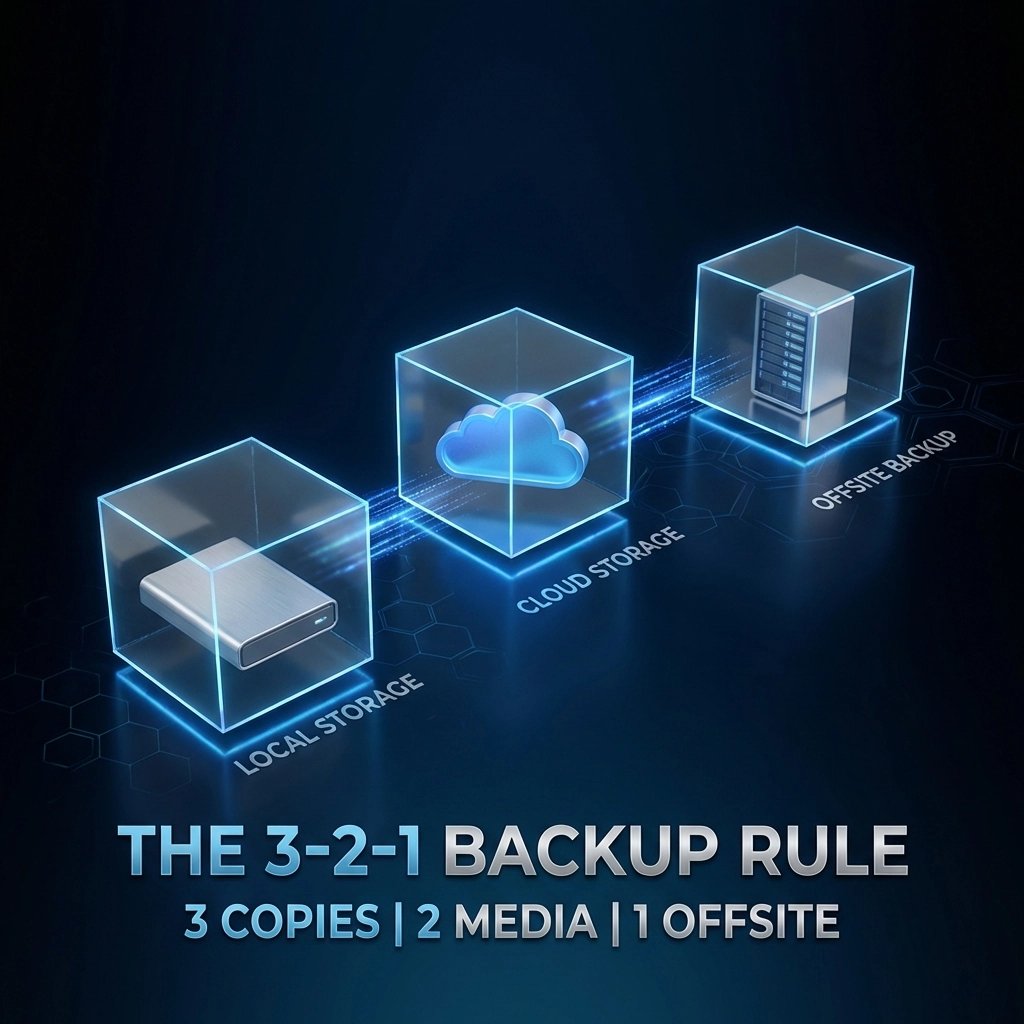
Follow the 3-2-1 backup rule:

  • 3 copies of your data
  • 2 different storage types (local + cloud)
  • 1 copy stored offsite or in a geographically separate location

This hybrid approach gives you fast local recovery for everyday issues while protecting against catastrophic events like fires, floods, or coordinated cyberattacks.


Mistake #3: Confusing Cloud Storage with Real Backups

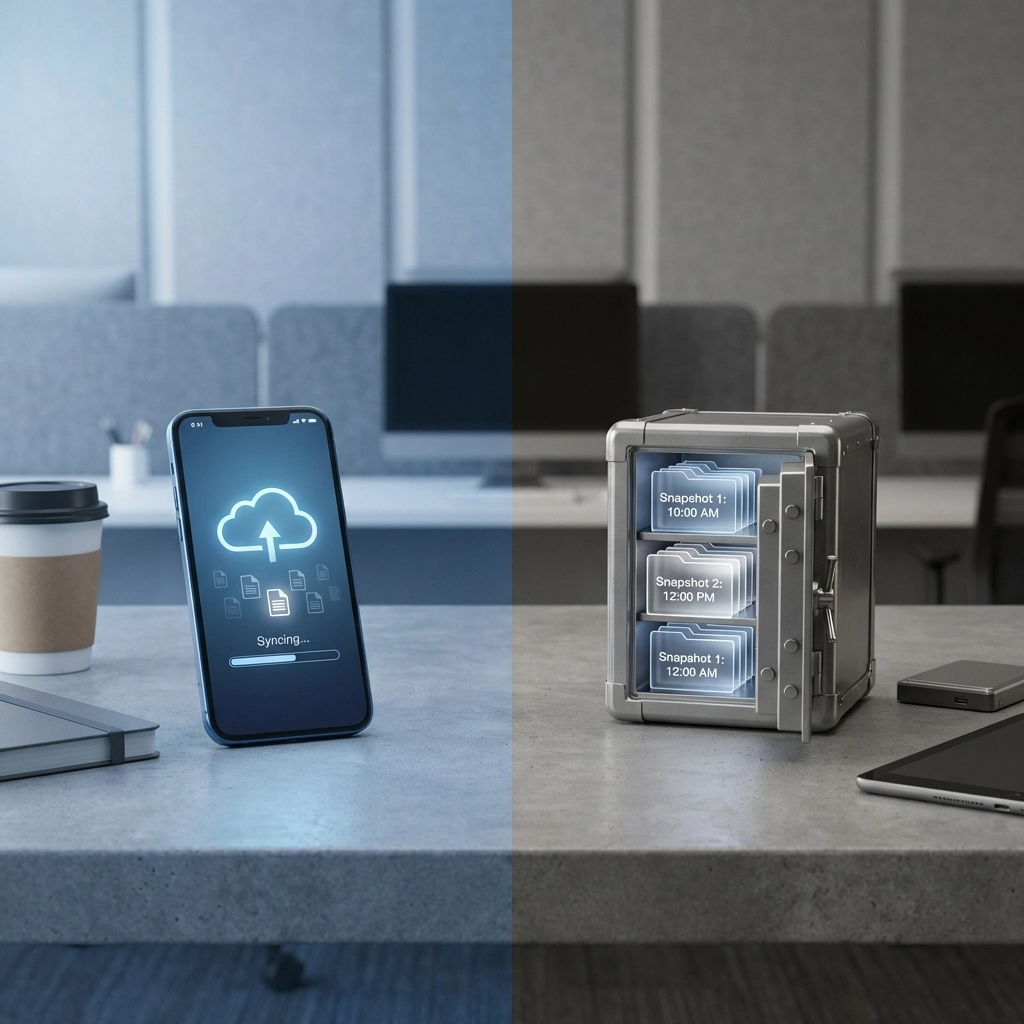
This misconception catches a lot of businesses off guard. Services like Google Drive, Microsoft OneDrive, and Dropbox are sync services, not backup solutions.

Here's the critical difference: if you delete a file (accidentally or due to ransomware), that deletion syncs across all your connected devices. Your "backup" disappears right along with your original.

What to do instead:

  • Use dedicated backup software that creates versioned, point-in-time snapshots
  • Implement solutions with ransomware detection and rollback capabilities
  • Consider enterprise-grade cloud and data services designed for business continuity

Sync is convenient. Backup is essential. Don't confuse the two.

Visual metaphor showing the 3-2-1 backup rule with local, cloud, and offsite data protection for businesses.


Mistake #4: Keeping All Backups in One Physical Location

Your server room has a backup drive sitting right next to your main servers. Feels secure, right?

Wrong. A single fire, flood, power surge, or break-in could wipe out your primary systems AND your backups simultaneously. We've seen businesses lose years of data because their "backup" was sitting three feet from the server it was supposed to protect.

What to do instead:

  • Store at least one backup copy in a geographically separate location
  • Use cloud backup services with data centers in different regions
  • For critical systems, consider real-time replication to a secondary site
  • Work with IT professionals to design infrastructure that builds in redundancy

Geographic separation isn't paranoid, it's practical.


Mistake #5: Ignoring Configuration Drift

Your business evolves. You add new applications, spin up new servers, onboard new employees. But does your backup system keep up?

Configuration drift happens when your production environment changes but your backup policies stay frozen in time. That new CRM you implemented last quarter? The customer database on that new server? They might not be backed up at all.

What to do instead:

  • Audit your backup coverage quarterly
  • Automatically discover and include new systems in your backup policies
  • Maintain documentation of what's being backed up (and what's not)
  • Review backup reports to catch gaps before they become disasters

Comparison of cloud sync vs secure backup vault, illustrating best practices for business data safety.


Mistake #6: Weak Access Controls on Backup Systems

Your backups contain everything, customer data, financial records, proprietary information. If the wrong person gains access, they can delete, corrupt, or steal your entire safety net.

Insider threats and stolen credentials are real risks. And yet, many businesses treat backup system access as an afterthought.

What to do instead:

  • Implement multi-factor authentication (MFA) on all backup systems
  • Use role-based access controls, not everyone needs admin privileges
  • Maintain audit trails of who accessed backups and when
  • Regularly review and revoke access for former employees

For comprehensive protection, pair your backup strategy with robust cybersecurity solutions that address both prevention and recovery.


Mistake #7: No Documented Recovery Plan

Having backups is only half the battle. Do you know how long it would take to actually restore your systems? Does your team know what to do if you're unavailable?

Without a documented disaster recovery plan, even good backups can lead to chaotic, delayed recoveries that cost you time, money, and customer trust.

What to do instead:

  • Create a written disaster recovery plan with step-by-step procedures
  • Assign clear roles and responsibilities
  • Define your Recovery Time Objective (RTO) and Recovery Point Objective (RPO)
  • Run tabletop exercises to practice your response

Need inspiration? See how one retail franchise unified their tech stack and dramatically reduced downtime with the right planning.

Modern data center with stormy weather and redundant backup site, emphasizing geographic disaster protection.


FAQ: Business Internet Backup Best Practices

Q: How often should I test my backups?
A: At minimum, test quarterly. For mission-critical systems, monthly testing is recommended. Always test after any major infrastructure changes.

Q: Is cloud backup alone enough for my business?
A: Cloud backup is excellent but shouldn't be your only solution. A hybrid approach combining local and cloud backups provides the best protection and fastest recovery options.

Q: What's the difference between RTO and RPO?
A: RTO (Recovery Time Objective) is how quickly you need systems back online. RPO (Recovery Point Objective) is how much data loss is acceptable (e.g., losing 1 hour of data vs. 24 hours).

Q: Can ransomware affect my backups?
A: Yes: if your backups are connected to your network, ransomware can encrypt them too. Air-gapped or immutable backups provide protection against this threat.

Q: How do I know if my current backup strategy has gaps?
A: A professional IT assessment can identify vulnerabilities, coverage gaps, and opportunities to improve your disaster recovery posture.


Don't Wait for Disaster to Find Out Your Backups Failed

Internet outages happen. Cyberattacks happen. Hardware fails. The question isn't if something will go wrong: it's when.

The businesses that survive and thrive are the ones that prepare proactively, not the ones scrambling to recover after the fact.

Ready to audit your backup strategy and close the gaps? Premier Business Team helps businesses nationwide design, implement, and test backup and disaster recovery solutions that actually work when you need them.

Contact Us Today →


#BusinessContinuity #DisasterRecovery #InternetSecurity #CyberSecurity #ITBackup #DataProtection #BusinessIT #TechTips2026

Data Center Solutions in Northern Virginia: Connectivity, Power, and Consulting

premierbusiness · January 23, 2026 ·

Northern Virginia isn't just a data center hub: it's the data center capital of the world. With over 250 data centers concentrated in what's commonly called "Data Center Alley," this region handles roughly 70% of global internet traffic. If you're planning a data center build, expansion, or colocation project in Loudoun County or the greater Northern Virginia area, you need a partner who understands the unique challenges and opportunities this market presents.

At Premier Business Team, we provide vendor-neutral consulting for data center connectivity, power infrastructure, alternative energy solutions, and full project coordination. Whether you're a hyperscaler, enterprise, or growing business, we help you navigate the complexities of data center planning without the bias of representing a single vendor.


Why Northern Virginia Dominates the Data Center Industry

Northern Virginia's rise as Data Center Alley didn't happen by accident. The region benefits from proximity to major fiber routes, a business-friendly regulatory environment, and access to skilled technical talent. Loudoun County alone hosts more data center capacity than most countries.

Key advantages of building in Northern Virginia include:

  • Direct access to major internet exchange points and submarine cable landing stations
  • Carrier-neutral facilities offering connections to AWS, Microsoft Azure, Google Cloud, and Oracle
  • Robust power grid infrastructure with multiple utility providers
  • Strong local government support and streamlined permitting processes
  • Proximity to federal agencies and Fortune 500 headquarters

For businesses requiring low-latency connections, regulatory compliance, and scalable infrastructure, Northern Virginia remains the gold standard.

image_1


Data Center Connectivity Solutions in Northern Virginia

Connectivity is the lifeblood of any data center operation. In Northern Virginia, carrier-neutral facilities provide access to 130+ service providers, enabling businesses to build redundant, high-performance network architectures without vendor lock-in.

What We Help You Evaluate and Implement:

  • Cloud on-ramps to AWS, Azure, Google Cloud, and Oracle Cloud Infrastructure
  • Cross connects and virtual cross connects for private, secure data exchange
  • Metro waves and dark fiber for high-bandwidth, dedicated connections
  • Internet exchanges and peering arrangements to optimize traffic routing
  • Direct internet access (DIA) with multiple upstream providers for redundancy

Premier Business Team works with you to assess your bandwidth requirements, latency tolerances, and growth projections. We then identify the best connectivity options across multiple providers: ensuring you get the performance you need at a competitive price.

Looking for guidance on network infrastructure design? We can help with that too.


Power Infrastructure: Capacity, Redundancy, and Reliability

Power is often the biggest constraint: and the biggest cost: in data center operations. Northern Virginia's data centers offer impressive utility power capacity, with some facilities providing over 140MW of utility power across their footprints.

Critical Power Considerations We Address:

  • Utility power capacity and availability from local providers like Dominion Energy
  • UPS (Uninterruptible Power Supply) systems for seamless failover
  • Generator capacity for extended outages and disaster scenarios
  • Power density requirements for high-performance computing, AI, and machine learning workloads
  • Redundancy levels (N+1, 2N, 2N+1) based on your uptime requirements

With the rise of AI and machine learning applications, power density has become a critical factor. Facilities certified for programs like the NVIDIA DGX-Ready Data Center program can support the intense power and cooling demands of GPU clusters. We help you identify which facilities meet your specific compute requirements.

image_2


Alternative Energy and Sustainability Solutions

Sustainability isn't just a buzzword: it's increasingly a business requirement. Many enterprises now mandate renewable energy sourcing for their data center operations, and Northern Virginia providers are stepping up with innovative solutions.

Green Data Center Options We Help You Explore:

  • Renewable energy procurement through power purchase agreements (PPAs)
  • On-site solar and wind installations where feasible
  • Liquid cooling systems for improved energy efficiency
  • Carbon offset programs and sustainability certifications
  • Energy-efficient facility designs with optimized PUE (Power Usage Effectiveness)

Premier Business Team helps you balance sustainability goals with operational requirements. We identify providers offering renewable energy options and assist with the procurement process: all while keeping your budget and performance needs front and center.


Vendor-Neutral Data Center Consulting Services

Here's where Premier Business Team stands apart: we don't represent any single data center provider. Our consulting services are 100% vendor-neutral, meaning our recommendations are based solely on what's best for your project.

Our Data Center Consulting Services Include:

  • Site selection and facility evaluation across Northern Virginia providers
  • Connectivity and carrier assessments to optimize network performance
  • Power and cooling analysis for current and future workloads
  • Compliance and certification reviews (SOC 1/2 Type II, PCI-DSS, ISO 27001, NIST 800-53)
  • Contract negotiation support to secure favorable terms
  • Migration planning and coordination for moves to new facilities
  • Ongoing vendor management and performance monitoring

Whether you're evaluating CoreSite, Digital Realty, Iron Mountain, RagingWire (NTT Data), Csquare, or other providers, we provide objective analysis and hands-on support throughout your project lifecycle.

Need help with business internet and connectivity at your other locations? We handle that nationwide.

image_3


Compliance and Security Standards in Northern Virginia Data Centers

Data center compliance isn't optional: especially for enterprises handling sensitive data or operating in regulated industries. Northern Virginia facilities typically meet rigorous security and compliance standards.

Common certifications you'll find in the region:

Certification Purpose
SOC 1 Type II Financial reporting controls
SOC 2 Type II Security, availability, processing integrity
PCI-DSS Payment card data protection
ISO 27001 Information security management
NIST 800-53 Federal information systems security
HIPAA Healthcare data protection

Premier Business Team helps you match your compliance requirements with facilities that meet or exceed those standards: eliminating guesswork and reducing audit headaches.


Frequently Asked Questions: Data Center Solutions in Northern Virginia

Why is Northern Virginia called Data Center Alley?

Northern Virginia, particularly Loudoun County, hosts over 250 data centers handling approximately 70% of global internet traffic. The concentration of facilities, fiber infrastructure, and cloud providers earned the region its "Data Center Alley" nickname.

What connectivity options are available in Northern Virginia data centers?

Most Northern Virginia facilities are carrier-neutral, offering access to 130+ service providers, direct cloud on-ramps to AWS, Azure, Google Cloud, and Oracle, plus cross connects, metro waves, internet exchanges, and peering services.

How much power capacity is available in Northern Virginia data centers?

Power capacity varies by facility, but some Northern Virginia data centers offer over 140MW of utility power, with extensive UPS and generator backup systems. High-density options are available for AI and machine learning workloads.

What compliance certifications do Northern Virginia data centers have?

Leading facilities maintain SOC 1/2 Type II, PCI-DSS, ISO 27001, NIST 800-53, and HIPAA certifications, among others.

Can I get help with data center site selection in Northern Virginia?

Yes. Premier Business Team provides vendor-neutral consulting for site selection, connectivity assessment, power analysis, compliance review, and contract negotiation across all major Northern Virginia providers.


Ready to Plan Your Northern Virginia Data Center Project?

Whether you're building new infrastructure, expanding existing capacity, or migrating to a colocation facility in Data Center Alley, Premier Business Team is here to help. Our vendor-neutral approach ensures you get unbiased recommendations tailored to your specific requirements.

Let's talk about your data center project.

Schedule a Free Consultation →

Learn more about Premier Business Team and how we help businesses nationwide with IT, telecom, and data center solutions.

  • « Go to Previous Page
  • Page 1
  • Interim pages omitted …
  • Page 26
  • Page 27
  • Page 28
  • Page 29
  • Page 30
  • Interim pages omitted …
  • Page 78
  • Go to Next Page »

Get a no obligation quote for your business. Learn More

Proud Chamber Member

Bellingham Chamber Badge

Premier Business Team

Copyright © 2026 · Premier Business Team 2219 Rimland Dr. Suite 301 Bellingham, WA 98226 - 360-946-2626

  • Home
  • Business Internet
  • Business Phone
  • Blog
  • About Us
  • Contact Us
  • Business Quote
  • Engineering
  • Call: 360-946-2626